

Designed by Parents, for Parents

Less screen time. More childhood.

End your child’s screen time from your own phone, or set a Routine and let screen time run on autopilot. No negotiating, no taking the device away.

Free for one parent and one child. No account needed. Android coming soon.

Have a question? Ask Quiet Screen
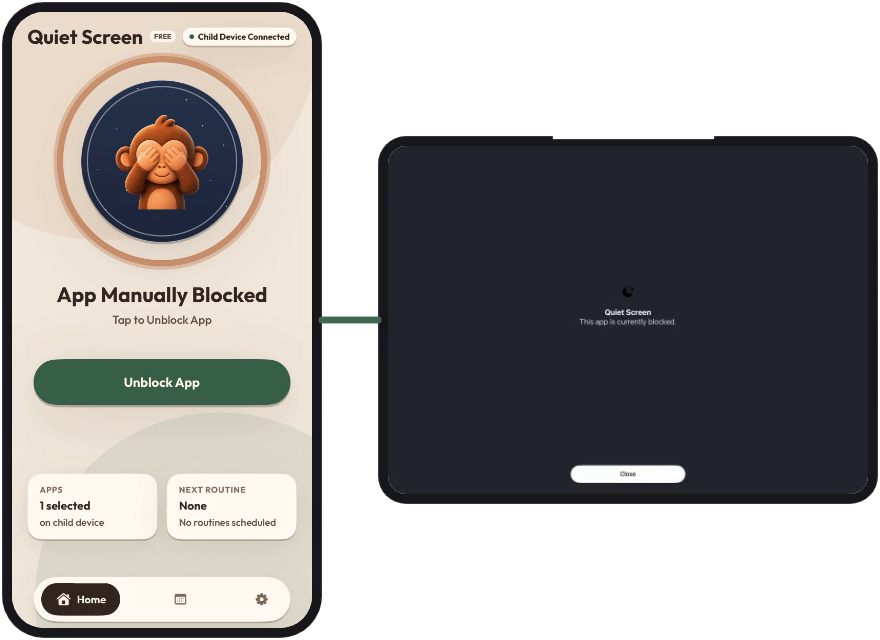
The parent’s phone showing App Manually Blocked with an Unblock App button, paired to the child’s tablet whose screen has gone dark.
Your phone. Tap Block App. Their device. The screen goes dark.

How Quiet Screen works

  1. Pair two devices

    Install Quiet Screen on your phone and your child’s, then pair them once with a code.

  2. Choose what to manage

    Pick the apps you want Quiet Screen to manage on your child’s device.

  3. Block and unblock from your phone

    One tap ends screen time, one tap brings it back. With Plus, Routines do it for you on a schedule.

Our story

It started with a bedtime battle.

Most parents know the struggle. In our house it came to a head at bedtime: ask for the tablet, get a “five more minutes,” and then either wrestle for it or deal with the meltdown. So I had an idea: what if my phone could act like a remote control for my kid’s tablet? One tap to end screen time, with no grabbing and no standoff.

Most screen-time apps help you manage your own screen time. Very few are built for a parent and a child’s device together. So this past summer I started building one, with a simple goal: the easiest way for a parent to end screen time with the tap of a button.

Then the idea grew. Bedtime is the same time every night, so why should a parent have to remember it every single day? We set bedtime in the app once and let it run on its own. That became Routines, the heart of Quiet Screen Plus.

It worked so well that my kid now says goodnight to the tablet and hands it over on his own.

I’m not anti-screen. Tablets can be great for learning and entertainment; it comes down to moderation. Quiet Screen is my family’s solution, and now it can be yours.

Less Remembering. More Consistency. Less Meltdowns.

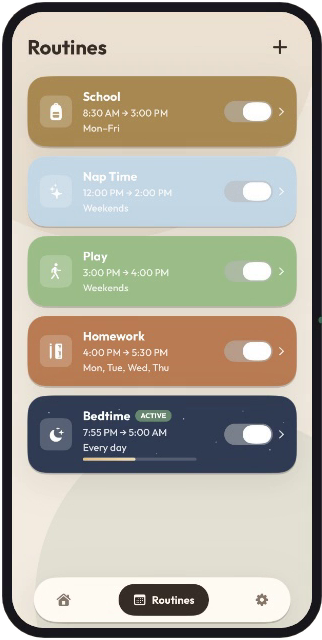
Quiet Screen Plus allows parents to automate screen time enforcement and build healthier screen habits. Set a Routine once, like bedtime or homework, and it runs every day without you remembering. Purchase Quiet Screen Plus on your parent account and it will support one child device.

The Routines screen in Quiet Screen Plus listing School, Nap Time, Play, Homework and an active Bedtime routine, each with its own schedule and switch.
Routines in Quiet Screen Plus

Annual Subscription – Limited Time Offer

$69.99 the first year

  • $95.88 at $7.99/mo
  • then $79.99/yr
  • Offer ends Dec 31, 2026
  • Standard pricing: $7.99/month or $79.99/year, with a 7-day free trial.
Redeem code PLUS25
Offer Code PLUS25

We’re building this with you.

Quiet Screen is built by a parent, for parents, and your feedback shapes what comes next. Tell us what’s confusing, what’s missing, or what you’d change.

Coming soon: Android support and Quiet Screen Family Plus for families with more than one child’s device. Send feedback and you’ll get free early access before it launches.

Ask Quiet Screen

Have a question?

Ask anything about how Quiet Screen works, what it costs, or whether it fits your family.

Answers come from Quiet Screen’s own help notes. For anything else, email support@quietscreen.app.

Start free tonight.

Two devices, one pairing code, and screen time ends when you say so.